
PROPERTY MANAGEMENT SYSTEMS
Mews
How D3x connects to the Mews PMS API: rates and availability, reservation lookup, folio actions, add-ons, dynamic guest portal links, and outbound guest journeys driven by Mews webhooks, across WhatsApp, SMS, email, and every other guest channel.
- Live Mews PMS API
- Rates and availability carousel
- Reservation lookup (phone or confirmation and name)
- Invoices and add-ons
- Dynamic guest portal / online check-in
- Outbound guest journeys (Mews webhooks)
Mews is a cloud-native PMS used by modern hotel groups. D3x treats it as the system of record for the stay: agents read inventory and reservations from Mews, answer with live context, write actions back, and run outbound guest journeys from Mews webhooks, on WhatsApp, SMS, email, website chat, voice, and social, with the same Skills Engine and audit trail as every other channel.
This page is the operator view of what the Mews connector can do. For the marketing overview, see the Mews integration page.
Rates, availability, and booking
When a guest asks about booking a stay, D3x connects to the Mews PMS API and pulls the catalogue the agent needs to answer with live inventory, not a static brochure.
- Room types: the sellable units configured in Mews
- Room type pictures: imagery from Mews, shown in the guest-facing carousel
- Rates and rate plans: including named packages (for example Stay Longer & Save, Standard Rate, Casita & Breakfast)
- Availability: for the dates and occupancy the guest specified
That data is used to serve rates and availability in the conversation. D3x can also connect to the Mews booking engine and provide a deep link so the guest can complete the booking in Mews. In messaging, matching room types appear in a carousel: each card shows the room photo, rate plans with estimated nightly prices, and a Book now action into the booking engine.
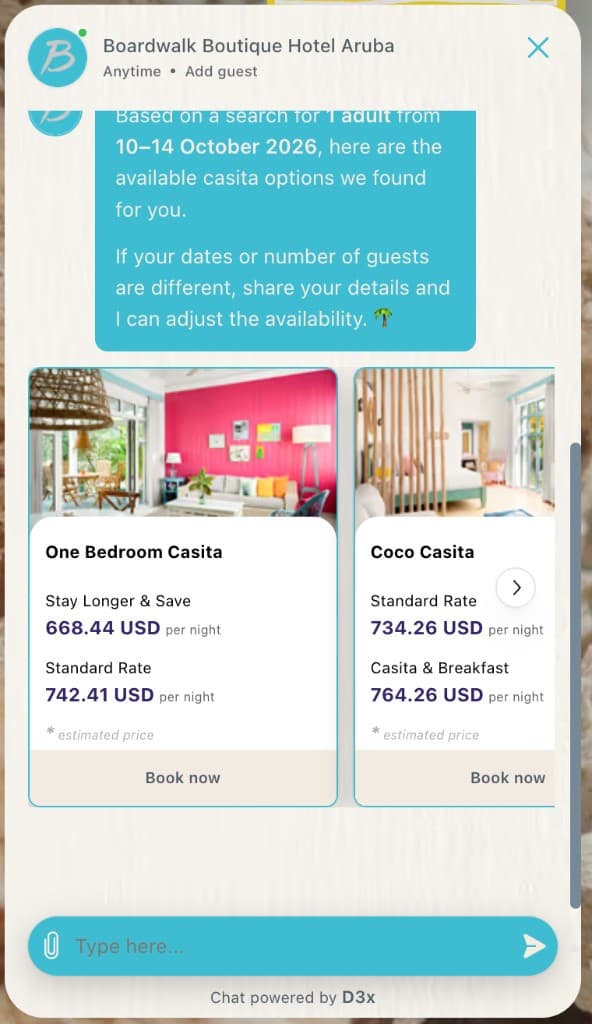
D3x tracks clicks into the direct Mews booking engine from the carousel, so you can validate how many guests actually opened a Book now link. Each click is also attributed a booking value from the inquiry context: if the guest asked about a room for two nights at $100 per night, that booking click is worth $200. That gives properties a clear view of carousel influence (click volume and estimated value) without waiting for a completed reservation to close the loop.
- 1
Guest asks about dates or a stay
Occupancy and date range are confirmed in the thread (for example 1 adult, 10 to 14 October).
- 2
D3x queries Mews
Room types, pictures, rates, availability, and rate plans are pulled from the Mews PMS API for that search.
- 3
Carousel and deep link
Available options render as cards with estimated prices. Book now opens the Mews booking engine for that stay. Clicks are tracked, including estimated booking value from nights × rate.
Find a reservation
Once the guest is talking about an existing stay, D3x needs the right Mews reservation in context (past, upcoming, or in progress) so it knows whether they are in-house, not yet arrived, or recently checked out.
Authenticated channels (for example WhatsApp)
D3x uses the WhatsApp phone number to search Mews for matching reservations. Full stay context is available without asking the guest to re-identify.
Website chat and social (Instagram, Facebook, and similar)
When the channel is not tied to a verified identity, the agent asks for reservation number and last name, then looks up Mews.
Guests often quote an OTA confirmation (for example a Booking.com reservation number). D3x still resolves the correct booking in Mews. It does not require the guest to know the internal Mews ID.
Answer questions about the reservation
With the reservation loaded, the agent can answer questions about that stay using live Mews data: dates, room type, rate, status, arrival expectations, and other fields on the booking. Replies stay grounded in the reservation in context, not generic FAQ copy.
Act on the reservation: invoices and add-ons
Beyond answers, D3x can execute common post-booking work in Mews while the guest stays on the same channel.
Invoices
When a guest asks for an invoice, D3x checks the reservation in Mews: the stay must be checked out and the invoice finalised. If both are true, the agent fetches the invoice from Mews and delivers it to the guest on whatever channel they are using (WhatsApp, web chat, email, and so on).
Upsells and add-ons
For extras such as breakfast, parking, early check-in, or late checkout, D3x connects to Mews, searches available add-ons for that reservation, quotes the live price, and when the guest confirms, attaches the add-on to the Mews reservation.
- Search available Mews products and add-ons for the stay
- Check the price of the add-on in Mews
- Attach the add-on to the reservation after guest confirmation
Dynamic guest portal and online check-in
If a guest wants to complete online check-in in the Mews guest portal, D3x uses the reservation in context, calls the Mews API, and generates a dynamic portal link to that guest's online check-in page. The guest opens the link and continues in Mews without a separate login step.
- Reservation in context
- Mews API generates portal link
- Guest opens check-in (no login)
Outbound guest journeys (Mews webhooks)
Inbound chat is only half of the Mews connection. D3x also runs outbound guest journeys: timed, segmented messages across WhatsApp, SMS, and email, triggered by Mews webhooks as the reservation moves through its lifecycle.
When a new reservation appears in Mews (or when the stay progresses), Mews notifies D3x. D3x can then send a WhatsApp confirmation, an SMS confirmation, or an email at the right moment, without staff copying and pasting from the PMS.
Stay events
Journeys can fire on many Mews events. The ones groups use most often:
- Booking confirmation: when the reservation first lands in Mews
- Pre-arrival: before the guest arrives
- Check-in: when they check in, or around that moment
- Pre-departure: before checkout
- Check-out / post-stay: when they leave, or after they have left
Messages can be scheduled before or after each event (for example a welcome WhatsApp the evening before arrival, or a thank-you SMS an hour after checkout).
Audience filters
Not every reservation should get every message. D3x filters the audience against live Mews fields so you segment who receives each send, for example a welcome journey for leisure guests who are not groups and staying fewer than five nights.
- Guest language
- Room type (include or exclude)
- Rate plan (include or exclude)
- Booking source
- Stay length / number of nights
- Group vs individual (and similar reservation attributes)
This is the same outbound guest journey capability described on the WhatsApp docs and the Outbound page, with Mews as the event source that starts each send.
Notable customers
These groups run D3x on Mews. The room-type carousel on this page is from Boardwalk Boutique Hotel Aruba.
- Amano Group: lifestyle boutique hotels in Germany and the UK
- Boardwalk Boutique Hotel Aruba: adults-only casitas, two Michelin Keys
- CIC Hospitality: Nordic operator, 30 hotels, including Flightgate Munich Airport
Go-live
Connecting Mews is a very simple go-live. The property does not need a custom API project or a long integration sprint. Install from the Mews marketplace, paste the token into D3x, and you are live. Most properties finish this in about two minutes.
- Open the Mews marketplace.
- Look for the D3x app.
- Install the app. Mews issues a token after install.
- Open the D3x integrations page and paste the token.
That is all it takes. Keep Mews as the system of record; D3x sits above it as AI Agents for Hotel groups across channels.